Do you own a Debenu Quick PDF Library 12/11/10/9/8/7? Upgrade to Debenu Quick PDF Library 13!

Foxit Quick PDF Library

Quick PDF Library 7.21 Beta 3 Released

July 27, 2010

Quick PDF Library 7.21 beta 3 has been released and is ready for testing. The 7.21 beta 3 installer can be downloaded from the button below.

Release Notes

This is in addition to the new features, bug fixes and enhancements from beta 1 and beta 2.

New functions
  • SetTextExtractionWordGap
  • GetFormFieldActionID
  • GetActionURL
  • SetActionURL
Enhancements
  • Improved memory usage and speed of processing/drawing CCITT images and stencil mask images
  • Bug fix: out of range error on array decoding
  • Major optimizations in document loading and saving
  • Enhanced handling of malformed stream objects

Bug fixes

  • Handling of out of range values in font CMaps
  • Handling of out of range value returned by the Win32 API GetFontData function
  • Rendering fill color for Type3 fonts
  • Handling of empty streams in the QPL painter
  • Corrected the rebuilding of the object index during merging
  • Improvements to the LoadFromFile/SaveToFile optimizations added in 7.21 Beta 2
  • Improvements to the parsing and handling of PDF array objects
  • Improvements to the handling of indirect objects in inherited page properties during merging

Feedback! Any feedback large or small is appreciated. We’ll shortly be planning the next round of exciting new features for Quick PDF Library, so we’d really like to know what you want to see added to the SDK. Don’t be shy, email us at support@quickpdflibrary.com and have your say.

By Rowan | Comments (3) | Posted in Quick PDF Library,Releases

Quick PDF Library 7.21 Beta 2 Released

July 16, 2010

Quick PDF Library 7.21 beta 2 has been released and is ready for testing. The 7.21 beta 2 installer can be downloaded from the button below.

Release Notes

This is in addition to the new features, bug fixes and enhancements from beta 1.

New functions
  • RemoveXFAEntries
  • DASetPageBox
Bug fixes and Enhancements
  • Improved memory usage and speed of processing/drawing CCITT images and stencil mask images
  • Bug fix: out of range error on array decoding
  • Major optimizations in document loading and saving
  • Enhanced handling of malformed stream objects

Feedback!

Any feedback large or small is appreciated. We’ll shortly be planning the next round of exciting new features for Quick PDF Library, so we’d really like to know what you want to see added to the SDK. Don’t be shy, email us at support@quickpdflibrary.com and have your say.

By Rowan | Comments (2) | Posted in Quick PDF Library,Releases

Quick PDF Library 7.19 Released

May 3, 2010

Quick PDF Library 7.19 has been released and is now ready for download from the updates page. The new version contains a number of significant performance improvements, new functions and much more.

The Quick PDF Library Demo has also been updated to work with version 7.19.

New Features and Improvements

  • Improved object parsing speed and handling of malformed data
  • DAAppendFile, DASaveAsFile and DASaveToStream functions now set the document’s modification date
  • Added usage rights functionality to the AnalyseFile function
  • New! RemoveEmbeddedFile function
  • Added EMF+ output to the renderer
  • New! AddLinkToLocalFile function
  • Added support for image ICC profiles to the renderer
  • New! RequestPrinterStatus function
  • Bug fix for return value of DrawTableRows function
  • New! SetCompatibility function
  • Improvements to /ICCBased color spaces in the renderer
  • Improvements to handling of buffer overruns in ASCII85 encoded data
  • Added support for miter limit to the renderer
  • Bug fix in decompressing flate data with a /Predictor value of 1
  • Bug fix in TrueType parser with composite characters (alignment of diacritical marks)
  • Optimizations to font handling in renderer and text extraction
  • Improved handling of Type3 fonts
  • Added support for handling of MMType1 fonts Optimizations to clipping paths in the renderer
  • Speed optimizations in the renderer with improved stack system
  • Improvements to the rendering of annotations with referenced resources
  • Improved speed of loading objects from source PDF documents
  • Improved speed of Type1 CFF conts Improvements to GetPageMode function
  • New! RemoveGlobalJavaScript function
  • New! SetEmbeddedFileStrProperty function
  • Improved parsing of empty array and dictionary objects
  • Improvements to accuracy of DrawTableRows
  • Added support for arrays to CMap parsing
  • Bug fix for rendering of large CCITT encoded images
  • Optimized adding of certain PNG images to PDF documents
  • Improved merging of documents with form fields
  • New! GetImagePageCountFromString function
  • Improvements to font substitution matching system in the renderer
  • Bug fix handling certain inline images
  • Improvements to adding EMF images to PDF documents
  • DASaveAsFile function maintains the original PDF version settings
  • Bug fix for underlines and highlights in center and right aligned text

Free Upgrade

Version 7.19 is a minor update and therefore all existing version 7.x license owners are entitled to a free upgrade. Owners of older versions of Quick PDF Library can upgrade online here for $149.40.

Discuss The New Version

We’re proud of the community that has formed around Quick PDF Library, so we’d like to encourage new users to join in the fun and discuss the latest version of Quick PDF Library over at QuickPDF.org.

By Rowan | Comments (1) | Posted in News,Quick PDF Library,Releases

Quick PDF Library 7.18 Released

March 3, 2010

Quick PDF Library 7.18 has been officially released and is now ready for download from the updates page. The new version contains a number of significant additions and improvements to the library, including Delphi 2010 support, JPEG2000 / JPXDecode image support, enhanced unicode support and a whole lot more.

The full list of changes is listed below. As you can see, we’ve put a lot of work into version 7.18 over the past few months and we’re proud to make this our first official release of 2010. This is just the start of our exciting plans for 2010, so stay tuned…

New Features and Improvements

General
  • Improvements to cross reference table parsing
  • Improvements to decryption (permissions key encoding)
  • Improvements to random object names
  • Improvements to UTF-8 encoding and decoding
  • Bug fix in handling of read only files
  • Bug fix in parsing of Type 4 Functions
  • Bug fix in AddLinkToFile function for Unicode file names
  • DAOpenFile sets LastErrorCode values
  • Bug fix in processing of objects stored in object streams
  • Bug fix in DAOpenFileReadOnly function
  • DocJavaScriptAction supports “WC” rather than “DC”
  • Added 411 (File not found) to LastErrorCode
  • Added return code 2 to LoadFrom* functions (for detecting encrypted cross reference streams)
Page and document manipulation
  • Improvements to ExtractPageRanges function
  • Improvements to ExtractPages function
  • Improvements to CopyPageRanges function
  • New! SetPageBox function
  • Added options 4 and 5 to SetPageMode function (OCG and Attachments)
Fonts
  • Bug fix in AddTrueTypeFont* functions allowing text extraction from non-English code pages
  • Improvements to AddTrueTypeFont* functions, fonts in TrueType collections now supported
  • Bug fix parsing Type 1 fonts
Form Fields and Annotations
  • Support for adding choice fields
  • Bug fix in GetAnnot*Property retrieving annotation page number
  • New! IsAnnotFormField function
  • New! AttachAnnotToForm function
  • New! NewChildFormField function
  • Added tag 131 to GetAnnotIntProperty for page number of GoTo link
  • NewFormField can create parent form fields
Text extraction and rendering
  • Improvements to handling pages with inline images
  • Added support for composite fonts with variable-length encoding
  • Added support for predefined CMaps
  • Improved handling of 8-bit CMaps
  • Bug fix for handling of paths in Winding mode
  • Improvements to alpha transparency masks
  • Added support for named color spaces
  • Bug fix for text extraction CSV output with properly quoted strings
  • Bug fix in Type 1 font rasterizer
  • New! PrintDocumentToFile function
Images
  • Bug fix handling inverted Packbits TIFF images
  • Added support for rendering JPEG2000 images (not available in Delphi 4 and Delphi 5 Editions)
  • Added support for CalGray color space
  • Optimized handling of 1-bit mono image data
  • Added support for LZW predictors
Unicode support
  • AddFormField – SubName parameter
  • DAGetFormFieldTitle – return string
  • DAGetFormFieldValue – return string
  • DAOpenFileReadOnly – FileName parameter
  • ExtractFilePages – InputFileName parameter (previously only in Delphi/DLL Edition)
  • ExtractFilePages – OutputFileName parameter (previously only in Delphi/DLL Edition)
  • FileListItem – return string (previously only in Delphi/DLL Edition)
  • FindFormFieldByTitle – Title parameter
  • GetAnnotStrProperty – return string (previously only for two tags)
  • GetFormFieldCaption – return string
  • GetFormFieldChildTitle – return string
  • GetFormFieldDefaultValue – return string
  • GetFormFieldDescription – return string
  • GetFormFieldTitle – return string
  • GetFormFieldValue – return string
  • GetFormFieldValueByTitle – return string
  • GetFormFieldValueByTitle – Title parameter
  • GetTempPath – return string (previously only for Delphi/DLL Edition)
  • NewFormField – Title parameter
  • SaveToFile – FileName parameter (previously only in Delphi/DLL Edition)
  • SetFormFieldCaption – NewCaption parameter
  • SetFormFieldTitle – NewTitle parameter
  • SetFormFieldDefaultValue – NewDefaultValue parameter
  • SetFormFieldDescription – NewDescription parameter
  • SetFormFieldValue – NewValue parameter
  • SetFormFieldValueByTitle – Title parameter
  • SetFormFieldValueByTitle – NewValue parameter
  • SetGDIPlusFileName – DLLFileName parameter (previously only in Delphi/DLL Edition)
  • SetTempFile – FileName parameter (previously only in Delphi/DLL Edition)
  • SignFile – InputFileName parameter (previously only in Delphi/DLL Edition)
  • SignFile – SignatureFieldName parameter
  • SignFile – OutputFileName parameter (previously only in Delphi/DLL Edition)
  • SignFile – PFXFileName parameter (previously only in Delphi/DLL Edition)
  • StoreCustomDataFromFile – FileName parameter (previously only in Delphi/DLL Edition)

Free Upgrade

Version 7.18 is a minor update and therefore all existing version 7.x license owners are entitled to a free upgrade. Owners of older versions of Quick PDF Library can upgrade online here for $149.40.

Discuss The New Version

We’re proud of the community that has formed around Quick PDF Library, so we’d like to encourage new users to join in the fun and discuss the latest version of Quick PDF Library over at QuickPDF.org.
By Rowan | Comments (1) | Posted in News,Quick PDF Library,Releases

Quick PDF Library 7.17 Released

October 28, 2009

Quick PDF Library 7.17 has been released and is now ready for download from the updates page. The new version contains a number of significant improvements to unicode support, text extraction, EMF support and much more.

New Features and Improvements

  • New GetDocumentFileName function
  • Encrypted documents are no longer auto-decrypted in some circumstances (same behaviour as 7.15 and earlier)
  • MergeStreams, MergeFiles and MergeFileList functions now merge bookmarks
  • FlattenFormField function now works even if the form field does not have a /P (page) entry
  • New tags to retrieve the following annotation properties:

    Subject (/Subj)
    In reply to (/IRT)
    Unicode filename (/UF)
    Page number of GoTo link
  • PDFs with certain malformed stream objects can now be loaded (e.g. Microsoft Reporting Services PDFs)
  • Improved text extraction using mode 0
  • Improved accuracy and speed for PNG predictors in flate compressed images
  • The following code pages are now supported in the AddTrueTypeFont function:

    874 THAI_CHARSET
    932 SHIFTJIS_CHARSET
    936 GB2312_CHARSET
    949 HANGEUL_CHARSET
    950 CHINESEBIG5_CHARSET
    1256 ARABIC_CHARSET
    1361 JOHAB_CHARSET
  • Improved EMF import functionality
  • Improved masked image processing speed
  • Added support for malformed stream images with LF starting character
  • Added support for optional content groups in the renderer
  • XFA form field support now uses “MSXML2.DOMDocument” instead of “MSXML2.DOMDocument.4.0”
  • The following functions have been Unicode enabled:

    DAGetInformation
    DASetInformation
    SetCustomInformation
    GetCustomInformation
    SetInformationGetInformation
    GetCatalogInformation
    SetCatalogInformation
    RetrieveCustomDataToString
    StoreCustomDataFromString
    GetAnalysisInfo
    NewOutline
    SetOutlineTitle
    OutlineTitle
    NewStaticOutline
    GetOutlineJavaScript
    SetOutlineJavaScript
    AddLinkToJavaScript
    FormFieldJavaScriptAction
    GetFormFieldJavaScript
    SetOpenActionJavaScript
    PageJavaScriptAction
    DocJavaScriptAction
    AddGlobalJavaScript
    GetGlobalJavaScript
    GlobalJavaScriptPackageName
    GetPageJavaScript
    AddPageLabels
    GetPageLabel
    NewOptionalContentGroup
    GetOptionalContentGroupName
    GetDocumentFileName
    DAExtractPageText
    GetPageText
    ExtractFilePageText
    GetAnnotStrProperty
    SetAnnotStrProperty

Free Upgrade

Version 7.17 is a minor update and therefore all existing version 7.x license owners are entitled to a free upgrade. Owners of older versions of Quick PDF Library can upgrade online here for $149.40.

Discuss The New Version

We’re proud of the community that has formed around Quick PDF Library, so we’d like to encourage new users to join in the fun and discuss the latest version of Quick PDF Library over at QuickPDF.org.

By Rowan | Comments Off on Quick PDF Library 7.17 Released | Posted in News,Quick PDF Library,Releases

A Customizable Demo For Quick PDF Library

October 7, 2009

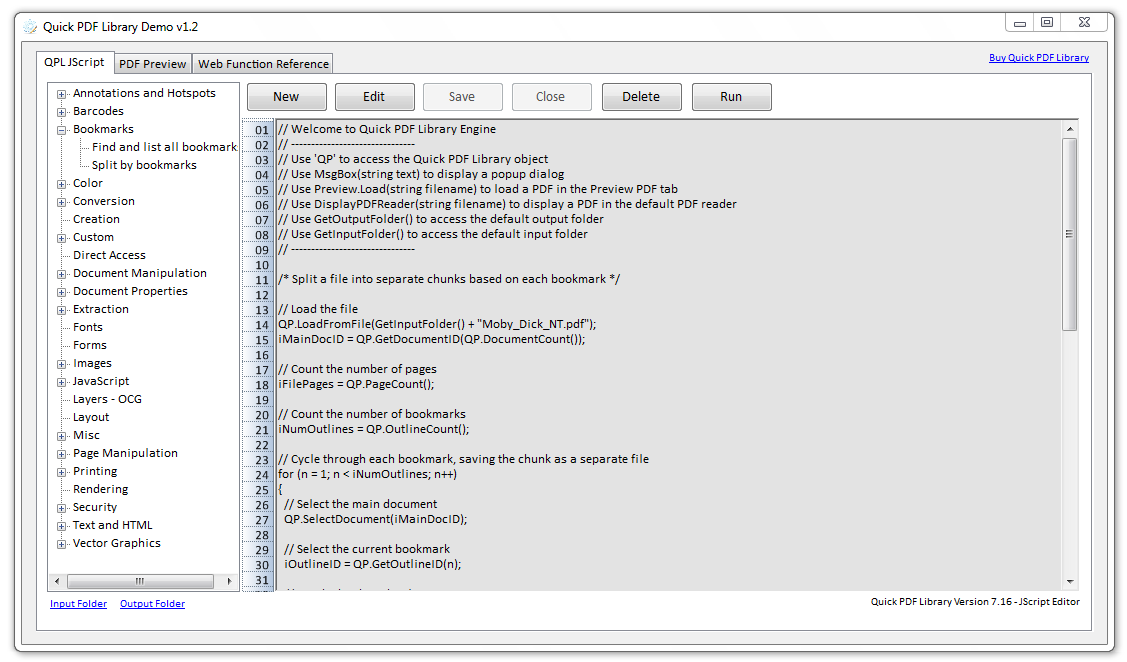
Evaluating PDF SDKs to find the one that’s right for you is a difficult process. Each SDK is unique and requires a certain amount of learning just in order to be able to get setup with it, never mind the effort required to actually find out if the component will meet all of your requirements.

Quick PDF Library Demo

That’s one of the reasons we’ve created a customizable demo application for Quick PDF Library. A demo application that shows you how to perform a wide range of different tasks — such as split pages by bookmarks, convert PDFs to images, extract text and much more — through customizable scripts.

Download the Quick PDF Library Demo

Quick PDF Library Demo

But to begin with, you don’t have to customize anything, you can just select one of the scripts and click on the Run button to see the library in action. No effort required. Then later, if you want to take the library for a spin, you can either customize an existing script or create a new script of your own and save it within the application for future use.

This demo is for new and existing customers alike. The default scripts provided demonstrate how to perform some of the most common PDF related tasks and will be updated frequently in the future with more useful scripts.

Keep in mind that this is only a beta release of the demo, so if you encounter any issues, please send us a message.

Enjoy!

Quick PDF Affiliate Program

September 22, 2009

It’s now easier than ever to share in the success of Quick PDF Library. Join our affiliate program and start receiving a 20% commission on every sale that you facilitate. Easy!

For more information on this new program visit our Affiliate Program page.

By Rowan | Comments Off on Quick PDF Affiliate Program | Posted in News

Quick PDF Library 7.15 Released

August 6, 2009

Quick PDF Library 7.15 has been released and is now ready for download from the updates page.

The new version includes a number of new exciting features and improvements, such as unicode support for filenames, support for GeoPDF dictionaries, improved EMF/WMF importing, font rendering and more.

New Features and Improvements

  • New SetBaseURL function
  • GeoPDF support. New related functions: AddLGIDictToPage, GetPageLGIDictCount, GetPageLGIDictContent and DeletePageLGIDict
  • New ImportEMFFromFile function
  • New SetAnnotStrProperty function
  • Renderer allows fonts to be direct objects as well as indirect objects
  • Improved font matching in renderer
  • Implemented Deflate on image data with predictor and BitsPerComponent = 4

On top of these new exciting features and improvements, there were a number of minor improvements and bug fixes.

Free Upgrade

Version 7.15 is a minor update and therefore all existing version 7.x license owners are entitled to a free upgrade. Owners of older versions of Quick PDF Library can upgrade online here for $149.40.

Discuss The New Version

We’re proud of the community that has formed around Quick PDF Library, so we’d like to encourage new users to join in the fun and discuss the latest version of Quick PDF Library over at QuickPDF.org.

By Rowan | Comments Off on Quick PDF Library 7.15 Released | Posted in News,Quick PDF Library,Releases

Getting To Know The TCP/IP Edition Of Quick PDF Library

July 15, 2009

UPDATE: There is now a 64-bit compatible version of Quick PDF Library available as part of version 8. Read more here. Native 64-bit support is provided for the DLL, ActiveX and Delphi editions.

OK, here’s something you probably weren’t expecting – over the past few months, we’ve been working on a version of Quick PDF Library that does a few things.

Firstly, it provides you with the ability to work with 64-bit applications in a native 64-bit environment, as well as the flexibility of accessing Quick PDF Library via TCP/IP from any computer within network reach.

This new edition of the library is now being distributed with the current version of Quick PDF Library. You’ll find all of the files necessary for the TCP/IP edition in the default installation directory (C:\Program Files\Quick PDF Library\TCP).

In this short tutorial, we’re going to show you how to get up and running with this exciting new edition.

Step 1. Install the Quick PDF Library TCP/IP service

Copy the files QuickPDFTCP0714.exe and QuickPDFTCP0714.ini to the folder containing your application (example: C:\QuickPDFLibrary\TCP\

Open a command line in administrator mode, run the following command to install the service “C:\QuickPDFLibrary\TCP\QuickPDFTCP0714.exe” /install

Step 2. Start the service

Edit the settings file QuickPDFTCP0714.ini modifying the IP address and port as you wish:

IPAddress=127.0.0.1
Port=10005

This allows you access the local host on your machine – you can also use this to communicate with machines across your network.

Run the following command to start the service:
net start QuickPDFTCPService0714

Step 3. A simple C# example

Create a simple C# application and add the QuickPDFTCP0714.cs to your project.

Add a single button to the default form, double click and add the following action:

private void button1_Click(object sender, EventArgs e)
{
QuickPDFTCP0714.Client qp = new QuickPDFTCP0714.Client();
if (qp.Connect(“127.0.0.1”, 10005))
{
if (qp.UnlockKey(“YOUR KEY”) == 1)
{
qp.DrawText(100, 500, “Hello from C# via TCP/IP”);
qp.SaveToFile(“C:\\temp\\test.pdf”);
}
else
{
MessageBox.Show(“Could not unlock”);
}
}
}

Start the application, click the button, and then open an Explorer window and check the “c:\temp” folder. You should find a simple file, “test.pdf” with the “Hello from C# via TCP/IP” text in the middle.

How else can you use this?

  • Provide your .NET managed code a way of accessing Quick PDF Library.
  • Write 64-bit code targeting a 64-bit processor.
  • Connect to Quick PDF Library servers across networks.

I’m sure you’ll find lots of interesting uses for this interface, please leave a comment to let me know and we’ll publish some of these stories on the site.

Note: The TCP/IP socket interface provides the “glue” for the 32-bit Quick PDF Library to talk directly with 32-bit and 64-bit builds, managed processes and also remote installations.


Quick PDF Library 7.14 Released

June 16, 2009

Quick PDF Library 7.14 has been released and is ready for download from the updates page.

The new version includes powerful support for creating tables in your PDFs, as well as numerous new improvements and bug fixes.

New Features and Improvements:

  • Delphi 2009 improvements
  • Fixed CFF font decoding bug
  • Bug fix for fonts with /Differences array and no /ToUnicode entry
  • Bug fix for non-embedded fonts with slightly different standard font names
  • Bug fix for matching fonts characters with capital letters
  • New GetCanvasDC and LoadFromCanvasDC functions
  • New GetXFAFormFieldNames function
  • New GetXFAFormFieldName function
  • New GetXFAFormFieldCount function
  • Updated the docs for the XFA functions
  • New GetFontObjectNumber function
  • New SetAdvancePassword function
  • New CreateTable function
  • New SetTableColumnWidth function
  • New SetTableRowHeight function
  • New SetTableCellBorderColor function
  • New SetTableCellBorderColorCMYK function
  • New SetTableCellBorderWidth function
  • New SetTableCellBackgroundColor function
  • New SetTableCellBackgroundColorCMYK function
  • New SetTableCellPadding function
  • New SetTableCellAlignment function
  • New SetTableCellContent function
  • New SetTableCellTextColor function
  • New SetTableCellTextColorCMYK function
  • New SetTableCellTextSize function
  • New SetTableBorderColor function
  • New SetTableBorderColorCMYK function
  • New SetTableBorderWidth function
  • New MergeTableCells function
  • New DrawTableRows function
  • New GetTableLastDrawnRow function
  • New GetTableCellStrProperty function
  • New GetTableCellIntProperty function
  • New GetTableCellDblProperty function

Discuss The New Version

We’re proud of the community that has formed around Quick PDF Library, so we’d like to encourage new users to join in the fun and discuss the latest version of Quick PDF Library over at QuickPDF.org.

By Rowan | Comments Off on Quick PDF Library 7.14 Released | Posted in News,Quick PDF Library,Releases

« Older PostsNewer Posts »


© 2015 Debenu & Foxit. All rights reserved. AboutBuyContactBlogNewsletterSupportFAQProduct UpdatesForum