
A Customizable Demo For Quick PDF Library
Evaluating PDF SDKs to find the one that’s right for you is a difficult process. Each SDK is unique and requires a certain amount of learning just in order to be able to get setup with it, never mind the effort required to actually find out if the component will meet all of your requirements.
Quick PDF Library Demo
That’s one of the reasons we’ve created a customizable demo application for Quick PDF Library. A demo application that shows you how to perform a wide range of different tasks — such as split pages by bookmarks, convert PDFs to images, extract text and much more — through customizable scripts.
Download the Quick PDF Library Demo
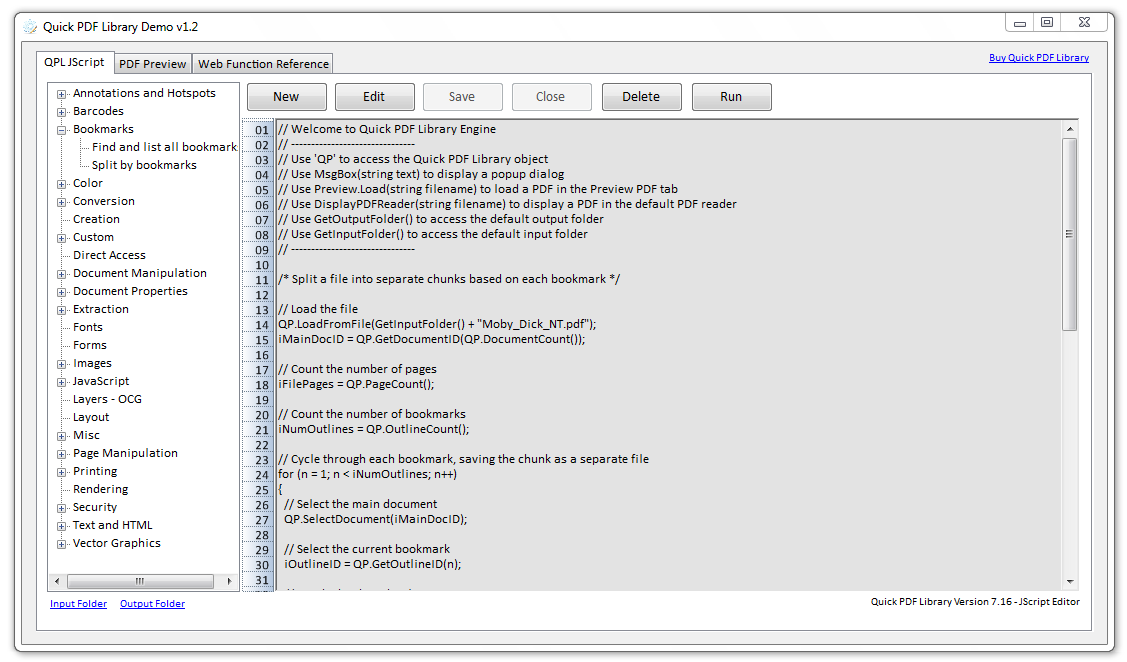
But to begin with, you don’t have to customize anything, you can just select one of the scripts and click on the Run button to see the library in action. No effort required. Then later, if you want to take the library for a spin, you can either customize an existing script or create a new script of your own and save it within the application for future use.
This demo is for new and existing customers alike. The default scripts provided demonstrate how to perform some of the most common PDF related tasks and will be updated frequently in the future with more useful scripts.
Keep in mind that this is only a beta release of the demo, so if you encounter any issues, please send us a message.
Enjoy!

[…] is the Demo app that we’ve included. It uses Quick PDF Library 7.17 and VBScript – check it out… This entry was written by Karl De Abrew, posted on November 29, 2009 at 6:08 am, filed under […]
Pingback by Quick PDF Library 7.17 released | Debenu Blog — November 29, 2009 @ 5:08 am
Thanks guys! This tool is a must have for any user of the Quick PDF Library!
Comment by Zarko Gajic — December 7, 2009 @ 8:03 am
How is the function:
QuickPDF0718.PDFLibrary::ReplaceTag(Tag As String, NewValue As String) As long
supposed to work? Do you have any samples?
Comment by Einar Tvete — March 15, 2010 @ 7:10 am
There is a knowledge base article which explains how the ReplaceTag function works, it can be seen online here:
http://help.quickpdflibrary.com/questions/190/how-does-the-replacetag-function-work
Comment by Rowan — March 18, 2010 @ 11:08 am
[…] Demo App […]
Pingback by » Quick PDF Library 7.19 Released » Quick PDF Library Blog — April 27, 2010 @ 1:17 pm
I moved the demo folders to c:\Program Files\Quick PDF … and I purchased the v 1.19 version. Now, the demo does not show the scripts. Is it due to the new version, or to the folder moving ?
Louis
Comment by Petiot — June 3, 2010 @ 8:24 am
It’s because you moved the Quick PDF Library Engine folder from the desktop to Program Files. I don’t think it can be located in the Program Files folder because of privileges issues when adding, deleting and editing the scripts. I’ll do some testing on my end though and if it is possible to include the demo in the Program Files folder I’ll update it for the next version, but for the time being it needs to be on the desktop.
Cheers,
– Rowan.
Comment by Rowan — June 3, 2010 @ 8:39 am
I can’t get the demo working on Windows 7 nor the other environment I have at hand, windows server 2003.
Once I have it installed on W7 – and try to run the application Windows states “QuickPDFLibraryHelp has stopped working” – this is the case if I run as Administrator and if I try to run in different OS modes. This is a real shame. Any ideas as to what could be the problem?
Comment by Craig — October 3, 2010 @ 3:03 am
Hi Craig,
Are both of these environments 64-bit? If so I’ll need to send you a special build of the Demo App. Email me at rowan.hanna@debenu.com and I’ll give you the link.
Cheers,
– Rowan.
Comment by Rowan — October 4, 2010 @ 12:03 am
I tried creating an image from PDF, its NOT working for PDFs with form fields (textbox, dropdowns etc.). Creates a junk image. Any help would be greatly appreciated.
Thanks !
Comment by Alpa — November 2, 2010 @ 10:45 am
Hi Alpa,
If you send your files to us at support@quickpdflibrary.com we can check them out and see what’s going wrong during the conversion.
Cheers,
– Rowan.
Comment by Rowan — November 3, 2010 @ 8:45 am
Hi Everyone,
I have updated Quick PDF Library demo to use version 7.22. The new version is 1.14. It’s also be compiled to target x86 architecture so it should run on 64-bit machines.
Cheers,
– Rowan.
Comment by Rowan — December 5, 2010 @ 12:03 pm
Hi,
I just downloaded and installed the demp application. Whenever I try to run one of the provided scripts after opening a pdf file, I receive an exception with the hint, that the system can not find an expected file (HRESULT: 0x80070002) at line number 1. What does that message mean?
Thanks, Christian
Comment by Christian — December 27, 2010 @ 8:28 am
Hi Christian,
What version of Windows are you running and it is 32-bit or 64-bit?
Also, make sure that “QuickPDFAX0723.dll” has been registered on your machine.
C:\Program Files\Quick PDF Library\Demo\QuickPDFAX0723.dll
Cheers,
– Rowan.
– Rowan.
Comment by Rowan — December 27, 2010 @ 1:08 pm
The Quick PDF Library Demo has been updated to support 7.24.
Comment by Rowan — May 5, 2011 @ 3:04 pm