Do you own a Debenu Quick PDF Library 12/11/10/9/8/7? Upgrade to Debenu Quick PDF Library 13!

Foxit Quick PDF Library

Determining Which Fonts Support A Particular Charset

December 16, 2010

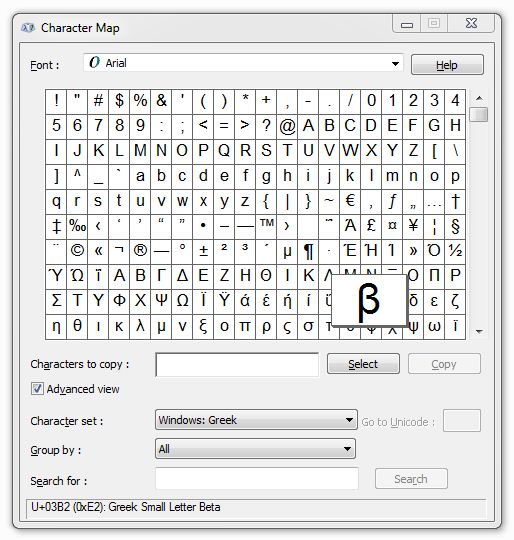
It can be a little difficult at times to determine which fonts support the character set that you’re trying to use. One option is to manually use the Windows Character Map utility to check each font available on your system to see if it provides support for your language. The Character Map utility can be accessed from Start > Run > charmap.

An alternative method, and a much quicker one, is to use the GetInstalledFontsByCharset function, which we added in version 7.21. This function allows you to specify a charset (ANSI, Hangeul, Russian, Baltic, Hebrew, Arabic, Greek, etc) and then to immediately see (via the string that is returned) a list of all the fonts installed on your machine which support the specified character set.

We’ve found it to be a very useful feature internally and we’re sure that you will too.

By Rowan | Comments Off on Determining Which Fonts Support A Particular Charset | Posted in Quick PDF Library,Tips & Tutorials

Quick PDF Library 7.17 Released

October 28, 2009

Quick PDF Library 7.17 has been released and is now ready for download from the updates page. The new version contains a number of significant improvements to unicode support, text extraction, EMF support and much more.

New Features and Improvements

  • New GetDocumentFileName function
  • Encrypted documents are no longer auto-decrypted in some circumstances (same behaviour as 7.15 and earlier)
  • MergeStreams, MergeFiles and MergeFileList functions now merge bookmarks
  • FlattenFormField function now works even if the form field does not have a /P (page) entry
  • New tags to retrieve the following annotation properties:

    Subject (/Subj)
    In reply to (/IRT)
    Unicode filename (/UF)
    Page number of GoTo link
  • PDFs with certain malformed stream objects can now be loaded (e.g. Microsoft Reporting Services PDFs)
  • Improved text extraction using mode 0
  • Improved accuracy and speed for PNG predictors in flate compressed images
  • The following code pages are now supported in the AddTrueTypeFont function:

    874 THAI_CHARSET
    932 SHIFTJIS_CHARSET
    936 GB2312_CHARSET
    949 HANGEUL_CHARSET
    950 CHINESEBIG5_CHARSET
    1256 ARABIC_CHARSET
    1361 JOHAB_CHARSET
  • Improved EMF import functionality
  • Improved masked image processing speed
  • Added support for malformed stream images with LF starting character
  • Added support for optional content groups in the renderer
  • XFA form field support now uses “MSXML2.DOMDocument” instead of “MSXML2.DOMDocument.4.0”
  • The following functions have been Unicode enabled:

    DAGetInformation
    DASetInformation
    SetCustomInformation
    GetCustomInformation
    SetInformationGetInformation
    GetCatalogInformation
    SetCatalogInformation
    RetrieveCustomDataToString
    StoreCustomDataFromString
    GetAnalysisInfo
    NewOutline
    SetOutlineTitle
    OutlineTitle
    NewStaticOutline
    GetOutlineJavaScript
    SetOutlineJavaScript
    AddLinkToJavaScript
    FormFieldJavaScriptAction
    GetFormFieldJavaScript
    SetOpenActionJavaScript
    PageJavaScriptAction
    DocJavaScriptAction
    AddGlobalJavaScript
    GetGlobalJavaScript
    GlobalJavaScriptPackageName
    GetPageJavaScript
    AddPageLabels
    GetPageLabel
    NewOptionalContentGroup
    GetOptionalContentGroupName
    GetDocumentFileName
    DAExtractPageText
    GetPageText
    ExtractFilePageText
    GetAnnotStrProperty
    SetAnnotStrProperty

Free Upgrade

Version 7.17 is a minor update and therefore all existing version 7.x license owners are entitled to a free upgrade. Owners of older versions of Quick PDF Library can upgrade online here for $149.40.

Discuss The New Version

We’re proud of the community that has formed around Quick PDF Library, so we’d like to encourage new users to join in the fun and discuss the latest version of Quick PDF Library over at QuickPDF.org.

By Rowan | Comments Off on Quick PDF Library 7.17 Released | Posted in News,Quick PDF Library,Releases

Support For Unicode Characters In Filenames And Paths

August 30, 2009

你好

مرحبا

おはよう ございます

привет

HALLÅ

हैलो

What have I written above you might be wondering? Well, I’ve tried* to write hello in a few different languages to highlight the new support for Unicode characters in filenames and paths — which was introduced with the release of version 7.15 of Quick PDF Library. The great news is that all of the above characters can now be properly handled in filenames and paths by all editions of our SDK.

There are many different ways to encode Unicode characters. One way is to use strings with 16-bit characters. COM/ActiveX uses 16-bit characters, so adding Unicode support for the ActiveX edition of the library was easy.

For the Delphi and DLL editions, the strings have always been 8-bit characters and unfortunately we can’t change the definition of functions to use strings with 16-bit characters as this would cause issues with backwards compatibility.

This means that when using the Delphi and DLL editions and working with Unicode characters, you need to encode your file names with UTF8 encoding, as mentioned in the function reference.

Different languages will have different functions to do the UTF8 encoding. For Delphi, the Utf8Encode function can be used, for example:

var
 FileNameW: WideString;
 FileNameA: AnsiString;
begin
 FileNameW := WideString('C:\unicode') + WideChar(20081) +
WideString('\test.pdf');
 FileNameA := Utf8Encode(FileNameW);
 QP.SaveToFile(FileNameA);
end;

That would save the file in the “C:\unicode乱\test.pdf” folder.

So far the response to the addition of this hotly demanded feature has been has been fantastic. If you have any other features that you really want to see added to Quick PDF Library in the not-to-distant future, visit our feedback page where you can suggest new features and vote on features that other customers have suggested.

* I hope I’ve written hello — if I’ve written something else, please let me know!

By Rowan | Comments Off on Support For Unicode Characters In Filenames And Paths | Posted in News,Quick PDF Library,Tips & Tutorials

Quick PDF Library 7.15 Released

August 6, 2009

Quick PDF Library 7.15 has been released and is now ready for download from the updates page.

The new version includes a number of new exciting features and improvements, such as unicode support for filenames, support for GeoPDF dictionaries, improved EMF/WMF importing, font rendering and more.

New Features and Improvements

  • New SetBaseURL function
  • GeoPDF support. New related functions: AddLGIDictToPage, GetPageLGIDictCount, GetPageLGIDictContent and DeletePageLGIDict
  • New ImportEMFFromFile function
  • New SetAnnotStrProperty function
  • Renderer allows fonts to be direct objects as well as indirect objects
  • Improved font matching in renderer
  • Implemented Deflate on image data with predictor and BitsPerComponent = 4

On top of these new exciting features and improvements, there were a number of minor improvements and bug fixes.

Free Upgrade

Version 7.15 is a minor update and therefore all existing version 7.x license owners are entitled to a free upgrade. Owners of older versions of Quick PDF Library can upgrade online here for $149.40.

Discuss The New Version

We’re proud of the community that has formed around Quick PDF Library, so we’d like to encourage new users to join in the fun and discuss the latest version of Quick PDF Library over at QuickPDF.org.

By Rowan | Comments Off on Quick PDF Library 7.15 Released | Posted in News,Quick PDF Library,Releases


© 2015 Debenu & Foxit. All rights reserved. AboutBuyContactBlogNewsletterSupportFAQProduct UpdatesForum