March 25, 2011
The official version of Quick PDF Library 7.24 has been released and is ready for download from our updates page. This version includes numerous bug fixes, enhancements and new functions. The 7.24 installer can also be downloaded from the button below.

Release Notes
New functions
- GetFormFieldNoExport
- GetFormFieldRequired
- SetFormFieldNoExport
- SetFormFieldRequired
- GetFormFieldChoiceType
- SetAnnotBorderStyle
- IsTaggedPDF
- DAEmbedFileStreams
- RemoveCustomInformation
Bug fixes
- Range check improvements to Type1 decoding
- Corrected missing letters in form field annotations
- Rendering and extraction of direct font dictionaries
- ToUnicode CMaps handled for non-CID fonts
- MissingWidth font metric used instead of DW
- Consistent handling of CCITT images on various operating systems
- Improvements to nested CID font widths structures
- Improvements to parsing of various destination structures
- Improvements to parsing of comments and whitespace
- Inline image resource stream improvements
- Memory allocation fix in JBIG2 decoder
- Bitmaps row access fix in JBIG2 decoder
- Appearance stream generation for auto-size fields now handles alignment correctly
- Resource names are now correctly normalized in the renderer
- Infinite loop in xref processing of small files eliminated
- Process DPI tags in TIFF images correctly (AP1 marker)
- Aspect ratio of canvas corrected
- EPS output bug fixes (miter limit and image references)
Enhancements
- DataMatrix 2D barcodes can be rotated
- Support for GS1-128 (EAN-128) barcodes
- Support for DeviceN color spaces
- Faster direct access page searching for very large documents
- DrawDataMatrixSymbol allows the fill color to be set
- Memory optimizations for ICC based images
- Get/set embedded file description
- CFF font data in OpenType fonts enabled for non-embedded fonts
- More options for getting/setting choice form field flags
- Added an option to retrieve an annotation’s border width
- Added support for B/W LZW images
- SetCustomInformation now allows empty values
Feedback! Any feedback large or small is appreciated. We’ll shortly be planning the next round of exciting new features for Quick PDF Library, so we’d really like to know what you want to see added to the SDK. Don’t be shy, email us at support@quickpdflibrary.com and have your say.
March 5, 2011
Quick PDF Library 7.24 beta 4 has been released and is ready for testing. This new beta includes several bug fixes, enhancements and new functions. The 7.24 beta 4 installer can be downloaded from the button below.
Release Notes
New functions
- GetFormFieldNoExport
- GetFormFieldRequired
- SetFormFieldNoExport
- SetFormFieldRequired
- GetFormFieldChoiceType
- SetAnnotBorderStyle
Bug fixes
- Range check improvements to Type1 decoding
- Corrected missing letters in form field annotations
- Rendering and extraction of direct font dictionaries
- ToUnicode CMaps handled for non-CID fonts
- MissingWidth font metric used instead of DW
- Consistent handling of CCITT images on various operating systems
- Improvements to nested CID font widths structures
- Improvements to parsing of various destination structures
- Improvements to parsing of comments and whitespace
- Inline image resource stream improvements
- Memory allocation fix in JBIG2 decoder
- Bitmaps row access fix in JBIG2 decoder
- Appearance stream generation for auto-size fields now handles alignment correctly
Enhancements
- DataMatrix 2D barcodes can be rotated
- Support for GS1-128 (EAN-128) barcodes
- Support for DeviceN color spaces
- Faster direct access page searching for very large documents
- DrawDataMatrixSymbol allows the fill color to be set
- Memory optimizations for ICC based images
- Get/set embedded file description
- CFF font data in OpenType fonts enabled for non-embedded fonts
- More options for getting/setting choice form field flags
- Added an option to retrieve an annotation’s border width
Feedback! Any feedback large or small is appreciated. We’ll shortly be planning the next round of exciting new features for Quick PDF Library, so we’d really like to know what you want to see added to the SDK. Don’t be shy, email us at support@quickpdflibrary.com and have your say.
February 26, 2011
Quick PDF Library 7.24 beta 3 has been released and is ready for testing. This new beta includes several bug fixes, enhancements and new functions. The 7.24 beta 3 installer can be downloaded from the button below.
Release Notes
New functions
- GetFormFieldNoExport
- GetFormFieldRequired
- SetFormFieldNoExport
- SetFormFieldRequired
Bug fixes
- Range check improvements to Type1 decoding
- Corrected missing letters in form field annotations
- Rendering and extraction of direct font dictionaries
- ToUnicode CMaps handled for non-CID fonts
- MissingWidth font metric used instead of DW
- Consistent handling of CCITT images on various operating systems
- Improvements to nested CID font widths structures
- Improvements to parsing of various destination structures
- Improvements to parsing of comments and whitespace
Enhancements
- DataMatrix 2D barcodes can be rotated
- Support for GS1-128 (EAN-128) barcodes
- Support for DeviceN color spaces
- Faster direct access page searching for very large documents
- DrawDataMatrixSymbol allows the fill color to be set
- Memory optimizations for ICC based images
- Get/set embedded file description
Feedback! Any feedback large or small is appreciated. We’ll shortly be planning the next round of exciting new features for Quick PDF Library, so we’d really like to know what you want to see added to the SDK. Don’t be shy, email us at support@quickpdflibrary.com and have your say.
February 18, 2011
The goal of PDF is to enable users to exchange and view electronic documents easily and reliably, independent of the environment in which they were created or the environment in which they are viewed or printed.
PDF files can be thought of as self-contained composite documents made up of many instances of many things: page contents, images, graphics, fonts, colorspaces, metadata, annotations, links, digital signatures and more.
If you open up a PDF in a text editor you will notice that there are parts of it which make sense, but that the majority is unreadable to the human eye. That’s because much of the data in PDF files is stored inside binary streams, in which data has been encrypted or compressed. This binary data looks like garbage, but you can easily break your PDF just by adding a single character. It’s best not to edit PDF files directly in a text editor.
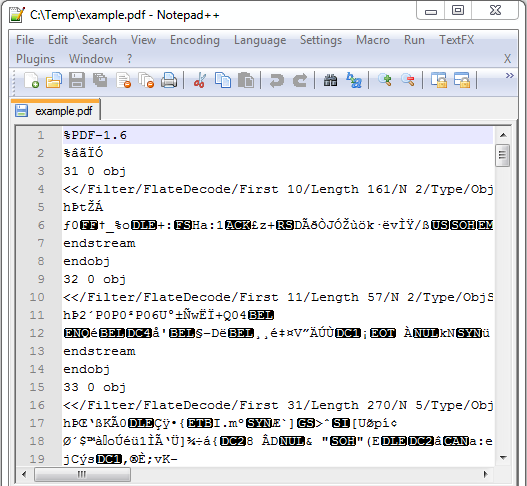
Underneath the hood PDF files are made from unordered numbered objects which can refer to each other by number and are all linked together by a cross reference table which maps object numbers to very specific places within the file.
At a low level PDF combines three technologies:
- A subset of the PostScript page description programming language, for generating the layout and graphics.
- A font-embedding/replacement system to allow fonts to travel with the documents.
- A structured storage system to bundle these elements and any associated content into a single file, with data compression where appropriate.
As you can see, PDF files are quite complex and it makes a lot of sense (and saves a lot of time and money) to use products such as Quick PDF Library to keep those complexities out of your life.
However, if you are interested in studying the internals of PDF files further then these resources should be helpful:
February 16, 2011
Instructions on how to get your free license of Quick PDF Tools Pro are at the bottom of this blog post.
Do you get tired of having to open a PDF in Acrobat or your PDF editor of choice just so that you can edit its document properties, split it into multiple documents or retrieve data from PDF forms? For many actions it’s not actually necessary to open and visually view the PDF. Unfortunately to access 99% of Acrobat’s features it is necessary.
But not if you’re using Quick PDF Tools Pro. This handy PDF utility, built using Quick PDF Library, lets you work with PDF files directly in Windows Explorer. Just right-click on a PDF and select the action you want to perform. No waiting required.
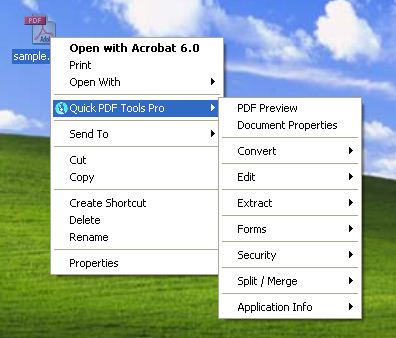
Quick PDF Tools Pro is jam-packed with features. Here’s a few:
- Advanced PDF Preview
- Edit PDF properties (Title, Author, Subject, and Keywords)
- Edit PDF layout, magnification and viewer preferences
- Add/Edit Custom Metadata
- View document security restrictions summary
- Add/remove passwords for PDF
- Convert (almost) any image to PDF, PDF to image, and PDF to text
- Convert and combine multiple images into one PDF
- Extract bookmarks to a text file
- Remove all bookmarks from a PDF
- View document fonts
- Merge selected PDF files into one PDF
- Split PDF files (various options available)
- Edit Attachments (Attach, Remove, Edit)
- Add, edit and remove JavaScript from PDF files
- Insert, extract, delete, rotate and crop pages in a PDF
- Extract CSV formatted text with data
- Extract embedded images to disk
- Extract form fields and form field data
- Flatten PDF form fields
- Remove all annotations including sticky notes and markup
- Add new bookmarks and edit existing bookmark actions
- Apply digital signatures to PDF files
All of these features were built using Quick PDF Library, but they do not represent all of the features available in our PDF SDK, not even close.
Free Quick PDF Tools Pro License
Normally Quick PDF Tools Pro is $59, but until the end of the month we’re offering all Quick PDF Library customers a free license, to say thanks for being a Quick PDF customer and to show the power of our SDK.
All you have to do to obtain your free license is to leave a comment on this blog post and include your email address in the email field. Don’t worry, your email address isn’t publish on the blog — it’s only the admins who can see it. We’ll follow up with you directly after you’ve posted your comment with your new license key.
We look forward to sending you a free license of Quick PDF Tools Pro. Hurry, only 2 weeks left.
February 7, 2011
Quick PDF Library 7.24 beta 2 has been released and is ready for testing. This new beta includes several bug fixes, enhancements and new functions. The 7.24 beta 2 installer can be downloaded from the button below.
Release Notes
New functions
- GetFormFieldNoExport
- GetFormFieldRequired
- SetFormFieldNoExport
- SetFormFieldRequired
Bug fixes
- Bug fix for handling of choice form fields
- Bug fix for processing of Separation color space
- Bug fix for duplicate rendering of image
Enhancements
- Range check improvements to Type1 decoding
- Support for GS1-128 (EAN-128) barcodes
- DataMatrix 2D barcodes can be rotated
- ActiveX edition now marked with ‘Safe for initializing’ and ‘Safe for scripting’ flags
- Support for DeviceN color spaces
- Minor documentation updates
Feedback! Any feedback large or small is appreciated. We’ll shortly be planning the next round of exciting new features for Quick PDF Library, so we’d really like to know what you want to see added to the SDK. Don’t be shy, email us at support@quickpdflibrary.com and have your say.
January 27, 2011
Quick PDF Library 7.24 beta 1 has been released and is ready for testing. This new beta is a minor release and includes several bug fixes and enhancements. The 7.24 beta 1 installer can be downloaded from the button below.
Release Notes
Bug fixes
- Bug fix for handling of choice form fields
- Bug fix for processing of Separation color space
- Bug fix for duplicate rendering of image
Enhancements
Feedback! Any feedback large or small is appreciated. We’ll shortly be planning the next round of exciting new features for Quick PDF Library, so we’d really like to know what you want to see added to the SDK. Don’t be shy, email us at support@quickpdflibrary.com and have your say.
December 20, 2010
Quick PDF Library 7.23 has been released and is ready for download.
This new version is a relatively minor release in comparison to 7.22 but it does include some exciting new additions — specifically a LIB edition of the SDK for C/C++ developers — and some important bug fixes and enhancements for digital signatures and font handling.
Release Notes
Enhancements
- First release of Quick PDF Library LIB Edition (static link .lib)
- Improvements to exception handling while accessing file streams
- Renderer handles images and vector graphics using the /Lab color space
- LoadFromCanvasDC allows control over which fonts are embedded
- Documentation improved for NewChildFormField function
New functions
- NoEmbedFontListCount
- NoEmbedFontListAdd
- NoEmbedFontListGet
- NoEmbedFontListRemoveIndex
- NoEmbedFontListRemoveName
- NoEmbedFontListRemoveAll
- NewPageFromCanvasDC
- SaveImageToString
- SaveImageToVariant
- DAHasPageBox
- DASetPageBox
- DADrawRotatedCapturedPage
Bug fixes
- Dingbats font is rendered correctly when drawn multiple times
- DASetPageBox supports Options = 3, 4 and 5 in accordance with the documentation
- DADrawCapturedPage handles direct page contents array
- SignFile handles encrypted files and files with cross reference streams
- DAAppendFile handles files with cross reference streams
- AddSubsettedFont and GetSubsetString functions handle character codes less than U+0100
- Pixel size of renderer output is now consistent with the DPI, page dimensions and SetRenderScale
Feedback! Any feedback large or small is appreciated. We’ll shortly be planning the next round of exciting new features for Quick PDF Library, so we’d really like to know what you want to see added to the SDK. Don’t be shy, email us at support@quickpdflibrary.com and have your say.
December 17, 2010
Exciting news for all of our C/C++ customers: we’ve just finished creating a statically linked version of Quick PDF Library.
The LIB Edition of Quick PDF Library is generated automatically by converting the DLL Edition into a static link library. The static link library file is called QuickPDFLIB0723.lib and a header file called QuickPDFLIB0723.h is included.
The new .LIB version will be included with the 7.23 release which will be made public very soon.
Make sure you read the getting started guide for the new .LIB version when you get it for some information on link dependencies and initializing/releasing the library.
December 5, 2010
A few months ago PicaJet, a happy customer of Quick PDF Library, wrote a review of the SDK on their website:
It took us about six months of experimenting before finally selecting Quick PDF Library from among all the other PDF libraries. Quick PDF Library is not 100% pure .NET code, but it still renders PDF documents with maximal speed and quality; it supports CMYK images; it quickly extracts native PDF properties; it sells for a reasonable price. And it is backed by a company with a solid reputation and history of excellence.
You can read the full review on PicaJet.com.

