
Quick PDF Tools Pro, Free For All Quick PDF Customers
Instructions on how to get your free license of Quick PDF Tools Pro are at the bottom of this blog post.
Do you get tired of having to open a PDF in Acrobat or your PDF editor of choice just so that you can edit its document properties, split it into multiple documents or retrieve data from PDF forms? For many actions it’s not actually necessary to open and visually view the PDF. Unfortunately to access 99% of Acrobat’s features it is necessary.
But not if you’re using Quick PDF Tools Pro. This handy PDF utility, built using Quick PDF Library, lets you work with PDF files directly in Windows Explorer. Just right-click on a PDF and select the action you want to perform. No waiting required.
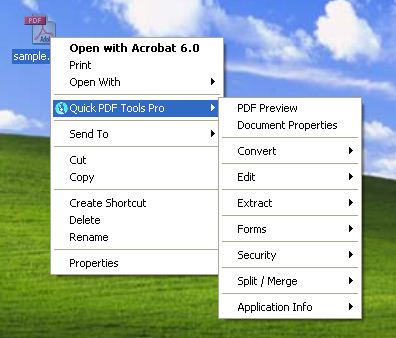
Quick PDF Tools Pro is jam-packed with features. Here’s a few:
- Advanced PDF Preview
- Edit PDF properties (Title, Author, Subject, and Keywords)
- Edit PDF layout, magnification and viewer preferences
- Add/Edit Custom Metadata
- View document security restrictions summary
- Add/remove passwords for PDF
- Convert (almost) any image to PDF, PDF to image, and PDF to text
- Convert and combine multiple images into one PDF
- Extract bookmarks to a text file
- Remove all bookmarks from a PDF
- View document fonts
- Merge selected PDF files into one PDF
- Split PDF files (various options available)
- Edit Attachments (Attach, Remove, Edit)
- Add, edit and remove JavaScript from PDF files
- Insert, extract, delete, rotate and crop pages in a PDF
- Extract CSV formatted text with data
- Extract embedded images to disk
- Extract form fields and form field data
- Flatten PDF form fields
- Remove all annotations including sticky notes and markup
- Add new bookmarks and edit existing bookmark actions
- Apply digital signatures to PDF files
All of these features were built using Quick PDF Library, but they do not represent all of the features available in our PDF SDK, not even close.
Free Quick PDF Tools Pro License
Normally Quick PDF Tools Pro is $59, but until the end of the month we’re offering all Quick PDF Library customers a free license, to say thanks for being a Quick PDF customer and to show the power of our SDK.
All you have to do to obtain your free license is to leave a comment on this blog post and include your email address in the email field. Don’t worry, your email address isn’t publish on the blog — it’s only the admins who can see it. We’ll follow up with you directly after you’ve posted your comment with your new license key.
We look forward to sending you a free license of Quick PDF Tools Pro. Hurry, only 2 weeks left.
