December 20, 2010
Quick PDF Library 7.23 has been released and is ready for download.
This new version is a relatively minor release in comparison to 7.22 but it does include some exciting new additions — specifically a LIB edition of the SDK for C/C++ developers — and some important bug fixes and enhancements for digital signatures and font handling.

Release Notes
Enhancements
- First release of Quick PDF Library LIB Edition (static link .lib)
- Improvements to exception handling while accessing file streams
- Renderer handles images and vector graphics using the /Lab color space
- LoadFromCanvasDC allows control over which fonts are embedded
- Documentation improved for NewChildFormField function
New functions
- NoEmbedFontListCount
- NoEmbedFontListAdd
- NoEmbedFontListGet
- NoEmbedFontListRemoveIndex
- NoEmbedFontListRemoveName
- NoEmbedFontListRemoveAll
- NewPageFromCanvasDC
- SaveImageToString
- SaveImageToVariant
- DAHasPageBox
- DASetPageBox
- DADrawRotatedCapturedPage
Bug fixes
- Dingbats font is rendered correctly when drawn multiple times
- DASetPageBox supports Options = 3, 4 and 5 in accordance with the documentation
- DADrawCapturedPage handles direct page contents array
- SignFile handles encrypted files and files with cross reference streams
- DAAppendFile handles files with cross reference streams
- AddSubsettedFont and GetSubsetString functions handle character codes less than U+0100
- Pixel size of renderer output is now consistent with the DPI, page dimensions and SetRenderScale
Feedback! Any feedback large or small is appreciated. We’ll shortly be planning the next round of exciting new features for Quick PDF Library, so we’d really like to know what you want to see added to the SDK. Don’t be shy, email us at support@quickpdflibrary.com and have your say.
December 16, 2010
It can be a little difficult at times to determine which fonts support the character set that you’re trying to use. One option is to manually use the Windows Character Map utility to check each font available on your system to see if it provides support for your language. The Character Map utility can be accessed from Start > Run > charmap.
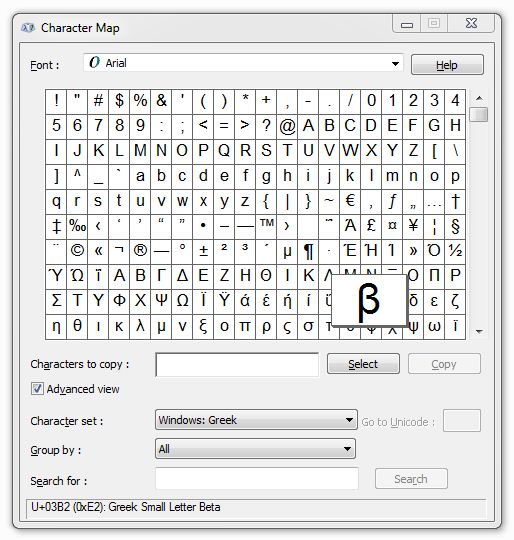
An alternative method, and a much quicker one, is to use the GetInstalledFontsByCharset function, which we added in version 7.21. This function allows you to specify a charset (ANSI, Hangeul, Russian, Baltic, Hebrew, Arabic, Greek, etc) and then to immediately see (via the string that is returned) a list of all the fonts installed on your machine which support the specified character set.
We’ve found it to be a very useful feature internally and we’re sure that you will too.
August 6, 2009
Quick PDF Library 7.15 has been released and is now ready for download from the updates page.
The new version includes a number of new exciting features and improvements, such as unicode support for filenames, support for GeoPDF dictionaries, improved EMF/WMF importing, font rendering and more.
New Features and Improvements
- New SetBaseURL function
- GeoPDF support. New related functions: AddLGIDictToPage, GetPageLGIDictCount, GetPageLGIDictContent and DeletePageLGIDict
- New ImportEMFFromFile function
- New SetAnnotStrProperty function
- Renderer allows fonts to be direct objects as well as indirect objects
- Improved font matching in renderer
- Implemented Deflate on image data with predictor and BitsPerComponent = 4
On top of these new exciting features and improvements, there were a number of minor improvements and bug fixes.
Free Upgrade
Version 7.15 is a minor update and therefore all existing version 7.x license owners are entitled to a free upgrade. Owners of older versions of Quick PDF Library can upgrade online here for $149.40.
Discuss The New Version
We’re proud of the community that has formed around Quick PDF Library, so we’d like to encourage new users to join in the fun and discuss the latest version of Quick PDF Library over at QuickPDF.org.

