February 7, 2011
Quick PDF Library 7.24 beta 2 has been released and is ready for testing. This new beta includes several bug fixes, enhancements and new functions. The 7.24 beta 2 installer can be downloaded from the button below.

Release Notes
New functions
- GetFormFieldNoExport
- GetFormFieldRequired
- SetFormFieldNoExport
- SetFormFieldRequired
Bug fixes
- Bug fix for handling of choice form fields
- Bug fix for processing of Separation color space
- Bug fix for duplicate rendering of image
Enhancements
- Range check improvements to Type1 decoding
- Support for GS1-128 (EAN-128) barcodes
- DataMatrix 2D barcodes can be rotated
- ActiveX edition now marked with ‘Safe for initializing’ and ‘Safe for scripting’ flags
- Support for DeviceN color spaces
- Minor documentation updates
Feedback! Any feedback large or small is appreciated. We’ll shortly be planning the next round of exciting new features for Quick PDF Library, so we’d really like to know what you want to see added to the SDK. Don’t be shy, email us at support@quickpdflibrary.com and have your say.
January 27, 2011
Quick PDF Library 7.24 beta 1 has been released and is ready for testing. This new beta is a minor release and includes several bug fixes and enhancements. The 7.24 beta 1 installer can be downloaded from the button below.
Release Notes
Bug fixes
- Bug fix for handling of choice form fields
- Bug fix for processing of Separation color space
- Bug fix for duplicate rendering of image
Enhancements
Feedback! Any feedback large or small is appreciated. We’ll shortly be planning the next round of exciting new features for Quick PDF Library, so we’d really like to know what you want to see added to the SDK. Don’t be shy, email us at support@quickpdflibrary.com and have your say.
January 21, 2011
UPDATE: There is now a 64-bit compatible version of Quick PDF Library available as part of version 8. Read more here. Native 64-bit support is provided for the DLL, ActiveX and Delphi editions.
A native 64-bit solution is not yet available but Quick PDF Library can be successfully run on on 64-bit machines using WoW64.
Here is the relevant information on this issue for each edition:
- Delphi Edition — Delphi generates 32-bit code and so Windows will know to automatically run it through WoW64 on 64-bit machines.
- ActiveX Edition — if you’re using Visual Studio (or similar) you will need to set the platform target to x86 instead of Any CPU.
- DLL Edition — if you’re using Visual Studio (or similar) you will need to set the platform target to x86 instead of Any CPU.
- TCP Edition — this edition is designed to run as a service and will run successfully on 32-bit and 64-bit machines.
The basic steps required for configuring a project in Visual Studio to work on 64-bit machines with either the ActiveX or DLL editions are shown below.
- Right-click on your project and select ‘Properties’ from the menu
- Click on the ‘Build’ tab
- Under ‘General’ change the ‘Platform target’ to x86
- Save
In the future we will release a native 64-bit version of Quick PDF Library. The library is written using the Delphi programming language and at this stage, Embarcadero has not released a 64-bit compiler for Delphi — although it is on their roadmap and they’re working on it. As soon as Embarcadero release a public beta version of their Delphi 64-bit compiler we’ll get to work on building a 64-bit compatible version of Quick PDF Library.
Finally, if you would like to be notified by email when we release a native 64-bit version of the library please let us know by leaving a comment.
December 21, 2010
As some of you may have noticed, Christmas is a few days away, so the team at Debenu will be taking a short break from the 24th of December until the 2nd of January to unwind and freshen up for the exciting year ahead. Of course by “break” we mean we’ll be checking our email every other minute as opposed to every minute. But, you get the idea.
A skeleton crew will be on hand to assist should you have any urgent issues that need to be dealt with prior to the end of the holiday period.
From everyone here at Debenu, we’d like to wish you a Merry Christmas and a Happy New Year.
Happy holidays!
December 20, 2010
Quick PDF Library 7.23 has been released and is ready for download.
This new version is a relatively minor release in comparison to 7.22 but it does include some exciting new additions — specifically a LIB edition of the SDK for C/C++ developers — and some important bug fixes and enhancements for digital signatures and font handling.
Release Notes
Enhancements
- First release of Quick PDF Library LIB Edition (static link .lib)
- Improvements to exception handling while accessing file streams
- Renderer handles images and vector graphics using the /Lab color space
- LoadFromCanvasDC allows control over which fonts are embedded
- Documentation improved for NewChildFormField function
New functions
- NoEmbedFontListCount
- NoEmbedFontListAdd
- NoEmbedFontListGet
- NoEmbedFontListRemoveIndex
- NoEmbedFontListRemoveName
- NoEmbedFontListRemoveAll
- NewPageFromCanvasDC
- SaveImageToString
- SaveImageToVariant
- DAHasPageBox
- DASetPageBox
- DADrawRotatedCapturedPage
Bug fixes
- Dingbats font is rendered correctly when drawn multiple times
- DASetPageBox supports Options = 3, 4 and 5 in accordance with the documentation
- DADrawCapturedPage handles direct page contents array
- SignFile handles encrypted files and files with cross reference streams
- DAAppendFile handles files with cross reference streams
- AddSubsettedFont and GetSubsetString functions handle character codes less than U+0100
- Pixel size of renderer output is now consistent with the DPI, page dimensions and SetRenderScale
Feedback! Any feedback large or small is appreciated. We’ll shortly be planning the next round of exciting new features for Quick PDF Library, so we’d really like to know what you want to see added to the SDK. Don’t be shy, email us at support@quickpdflibrary.com and have your say.
December 17, 2010
Exciting news for all of our C/C++ customers: we’ve just finished creating a statically linked version of Quick PDF Library.
The LIB Edition of Quick PDF Library is generated automatically by converting the DLL Edition into a static link library. The static link library file is called QuickPDFLIB0723.lib and a header file called QuickPDFLIB0723.h is included.
The new .LIB version will be included with the 7.23 release which will be made public very soon.
Make sure you read the getting started guide for the new .LIB version when you get it for some information on link dependencies and initializing/releasing the library.
December 16, 2010
It can be a little difficult at times to determine which fonts support the character set that you’re trying to use. One option is to manually use the Windows Character Map utility to check each font available on your system to see if it provides support for your language. The Character Map utility can be accessed from Start > Run > charmap.
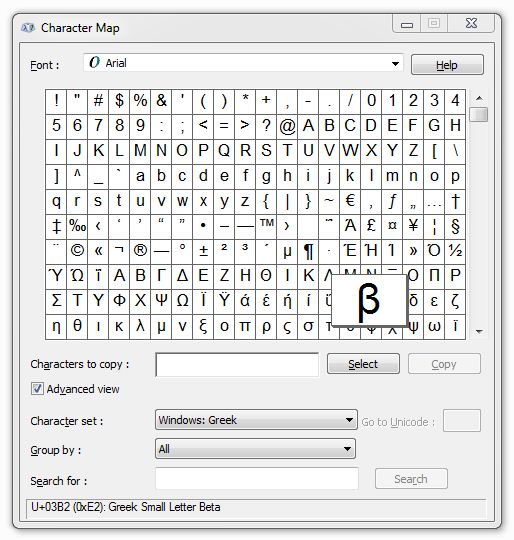
An alternative method, and a much quicker one, is to use the GetInstalledFontsByCharset function, which we added in version 7.21. This function allows you to specify a charset (ANSI, Hangeul, Russian, Baltic, Hebrew, Arabic, Greek, etc) and then to immediately see (via the string that is returned) a list of all the fonts installed on your machine which support the specified character set.
We’ve found it to be a very useful feature internally and we’re sure that you will too.
December 5, 2010
A few months ago PicaJet, a happy customer of Quick PDF Library, wrote a review of the SDK on their website:
It took us about six months of experimenting before finally selecting Quick PDF Library from among all the other PDF libraries. Quick PDF Library is not 100% pure .NET code, but it still renders PDF documents with maximal speed and quality; it supports CMYK images; it quickly extracts native PDF properties; it sells for a reasonable price. And it is backed by a company with a solid reputation and history of excellence.
You can read the full review on PicaJet.com.
December 2, 2010
We don’t usually publicize copyright infringements of our products — we prefer to deal with these issues privately — but unfortunately due to the risk that innocent customers might purchase pirated software, we’ve decided to alert the general public.
EzPDFlibrary is a pirated version of Quick PDF Library. I won’t link to their website, but it’s not hard to find. They have stolen the source code, documentation and samples and re-branded it as their own. They are now selling this software to unsuspecting customers. This is of course completely illegal, infringes our copyright for Quick PDF Library and of course defrauds innocent people of hard earned money.
We’re taking the appropriate action against this company (contacting their payment processor, web host and more) but you could be of great assistance to us if you alert anyone you see mentioning the name EzPDFlibrary to the fact that this is pirated software and should not be used. Instead, they should look at Quick PDF Library (obviously!).
It might be “Ez” to pirate software, but it certainly was not easy to build such a powerful library as Quick PDF Library over the past 10 years, so we’d appreciate any help you can provide in alerting your fellow developers to avoid these fraudsters and bring them down.
Thank you.
November 30, 2010
Quick PDF Library Lite 7.22, our highly popular free PDF SDK, has been released and is now ready for download. This new release includes two new functions — SetTextUnderline and DrawTextBox — as well as the relevant enhancements and bug fixes from the full Quick PDF Library 7.22 release.
If there are new functions that you think would really enhance Quick PDF Library Lite, post a comment and we’ll see what we can do in the next release.
To find out more about Quick PDF Library Lite visit this link: Free PDF library.

