
Quick PDF Tools 1.4 now incorporates PDF preview, PDF rendering, and PDF extraction
Quick PDF Tools is a shell application for Windows Explorer that we built using Quick PDF Library and is available as a free download. Version 1.4 was released only a couple of weeks ago and the application has been installed almost 10,000 times in a very short space of time. The new features included in version 1.4 are:
- PDF Preview — this amazing feature allows you right-click on a PDF document and view the first page, … instantly.
- Render PDF to image – creates a folder, and stores each PDF page as a JPEG
- Extract text – performs a simple extraction of the text in a PDF and stores in a .txt file
- Check for updates – performs a check with the Quick PDF Tools webserver, to advise the user if a new release is available.
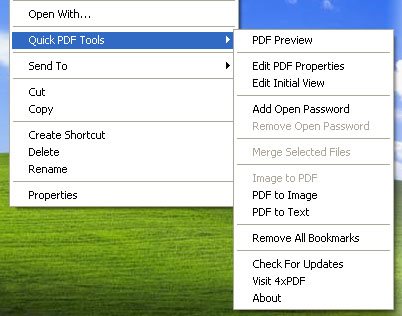
Quick PDF Tools is just one small example of what is possible using Quick PDF Library.

Hello,
I recently downloaded Quick PDF Tools 1.4 and there seems to be one section that is not working properly. When I pull up the “Initial View) dialog there does not seem to be a choice of options in the “Layout and Magnification” section. The combo boxes only have one option so I can’t seem to change anything (I was hoping to change the magnification, but “Default” is the only choice listed. The other two combo boxes in this section have the same problem. Maybe I cam doing something wrong, but I thought I should let you know, just in case.
Thank you for your time,
Gerald Sutherland
gesuther149@charter.net
Comment by Gerald Sutherland — May 18, 2009 @ 9:17 pm
Thank you for offering Quick PDF Tools. I am going to refer my clients to it. I look forward to trying Quick PDF Tools Pro. It looks like a good alternative for Adobe Acrobat and I intend to recommend that my clients upgrade to the Pro version.
Comment by Tom Hahn — June 9, 2011 @ 2:54 pm