
Analyzing TIFF images
Quick tip: a useful tool for analyzing TIFF images is tiffinfo.exe. It’s part of the LibTIFF library and the Windows binaries for the tool are available from the GnuWin32 project. Once installed you can access the tiffinfo.exe command line tool from it’s default installation location:
C:\Program Files\GnuWin32\bin\tiffinfo.exe
And then use something like the below to run a test against one of your TIFF images.
tiffinfo -D “C:\Temp\example.tif”
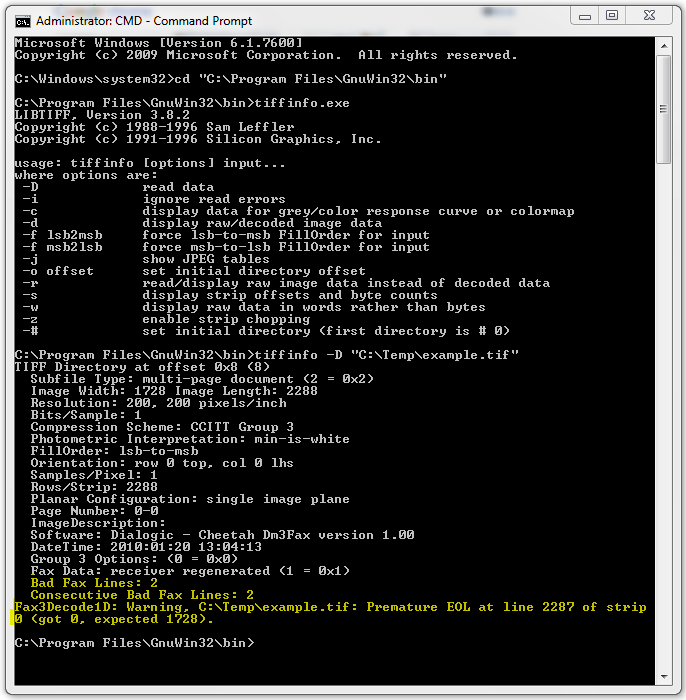
The tool will attempt to read the data from the TIFF image and will report the image width, resolution, compression and so on, as well as any errors. The example below shows that the tiffinfo.exe tool picked up a problem with the TIFF image that was causing subsequent problems (after the image had been added to a PDF) in Adobe Reader 9:
Does anyone else have any useful tools for analyzing TIFF images or other image types?

I’m fond of a similar GUI-based tool called AsTiffTagViewer, which is available for free from AWARE [SYSTEMS].
Comment by Spike — May 17, 2010 @ 4:38 pm
Thanks for the tip, I just installed AsTiffTagViewer and it is indeed a bit easier to use a GUI tool for the basic analysis of the properties of the TIFF image. It works well. Cheers!
Comment by Rowan — May 17, 2010 @ 10:16 pm